 WebMail


SanDisk Desk Drive USB SSD review: High capacity, 10Gbps performance
Expert rating
Occupation
- Available in larger 4TB and 8TB capacities.
- Good 10Gbps performer
- Attractive and unusual, if somewhat bulky, heat-dissipating design
Our decision
More capacity is always better when it comes to storage, and the Desk Drive USB SSD from SanDisk delivers it in 4TB or 8TB flavors, with decent 10Gbps performance.
SanDisk's new 10Gbps USB desktop drive is all about capacity. Actually, these ships Only in larger 4TB and 8TB flavors, at $380 and $700 MSRP, respectively – demonstrating a real commitment to a marketing strategy that positions the product as a hard drive replacement.
The desk drive is also on the large side for an external SSD and requires external power to operate, which is not unheard of for an external USB drive of this capacity, a bit unusual for a drive with only 10Gbps. Perhaps SanDisk is trying to make hard drive transitioners more comfortable?
Further reading: Check out our roundup Best external drives To learn about competing products.
What are the features of SanDisk Desktop Drive?
I've already spilled some beans on the subject – however, for its size, the desk drive measures a fairly solid 3.9 inches wide and tall, and about 1.5 inches between the slightly concave top and the anti-skid bottom. It's painted SanDisk's familiar dark gray, with orange piping encircling the unit near the vertical middle of the wall.
The back of the desk drive has a Type-C USB port, an AC adapter jack, and a Kensington lock port. And yes, the drive requires an external power source that the company provides. We tried using the drive without it, and no dice.

SanDisk apparently learned from itself Extreme Pro whose data cleaning problems may have arisen due to lack of power, and Seagate's FireCuda Gaming SSD A 20Gbps SSD, which will only perform at 10Gbps on some systems, likely caused the same problem (although thermal throttling could have been the culprit). Note that I have tested many 10Gbps and 20Gbps SSDs that perform fine using only bus power.
How much does a desktop drive cost?
Although I've already covered pricing above, it's useful to talk about the price of a desktop drive for what it's intended to be – a hard drive. At the time of this writing you can find Name brand external 8TB hard drive for $150 About 21 percent of the $700 (MSRP) 8TB desktop drive. Of course, the hard drive only provides 10 percent of the performance.
So the equation remains roughly the same when it comes to HDDs and SSDs: the former are significantly cheaper per gigabyte, while the latter are far faster, less fragile and more reliable. That said, HDD reliability is better than ever.
Buy as needed. If your backup is shutting down in the middle of the night when speed doesn't matter, go to HDD and get something for redundancy. If you're constantly stressing over your external storage for work when seconds, minutes, or hours count, shell out the extra cash for an SSD.
How fast is the SanDisk desktop drive?
As a 10Gbps USB SSD, the 8TB desk drive I tested is certainly faster than a hard drive and held its own in our testing against its 10Gbps competitors. That said, it's no match for 20Gbps or 40Gbps SSDs, which typically double benchmark results and cut transfer times in half.
CrystalDiskMark 8 rated the desk drive as very easy to perform a sequential transfer to a 10Gbps USB SSD as you can see below. It wasn't the fastest in every test, but overall it performed quite well.
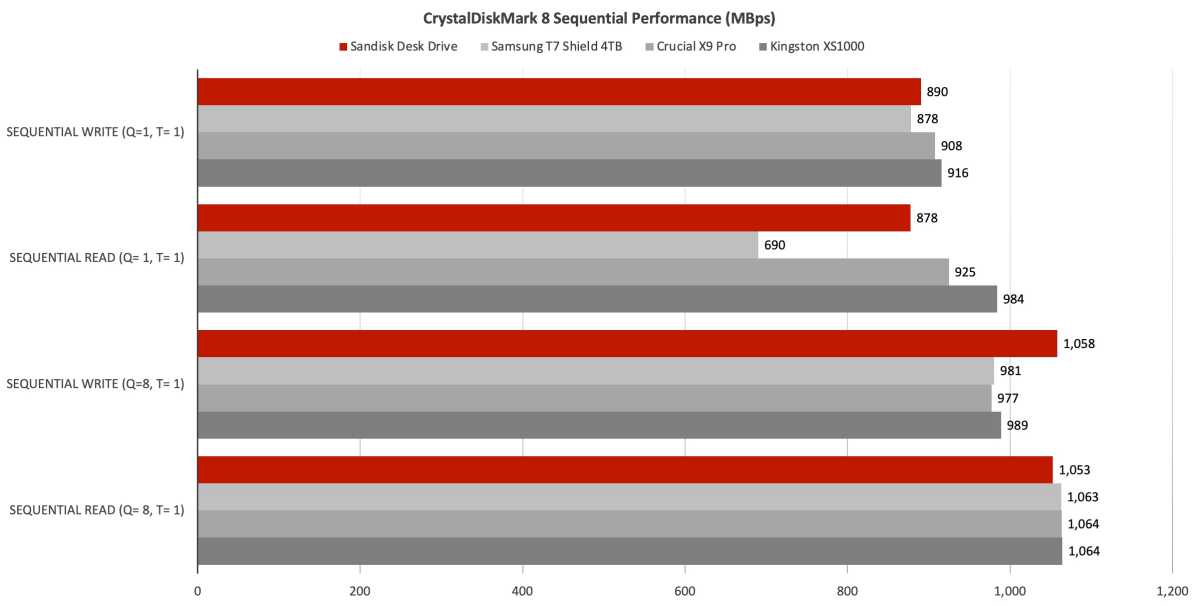
The SanDisk Desk Drive was very competitive in CrystalDiskMark 8.
The SanDisk Desk Drive was very competitive in CrystalDiskMark 8.
Jon L. Jacoby
The SanDisk Desk Drive was very competitive in CrystalDiskMark 8.
Jon L. Jacoby
Jon L. Jacoby
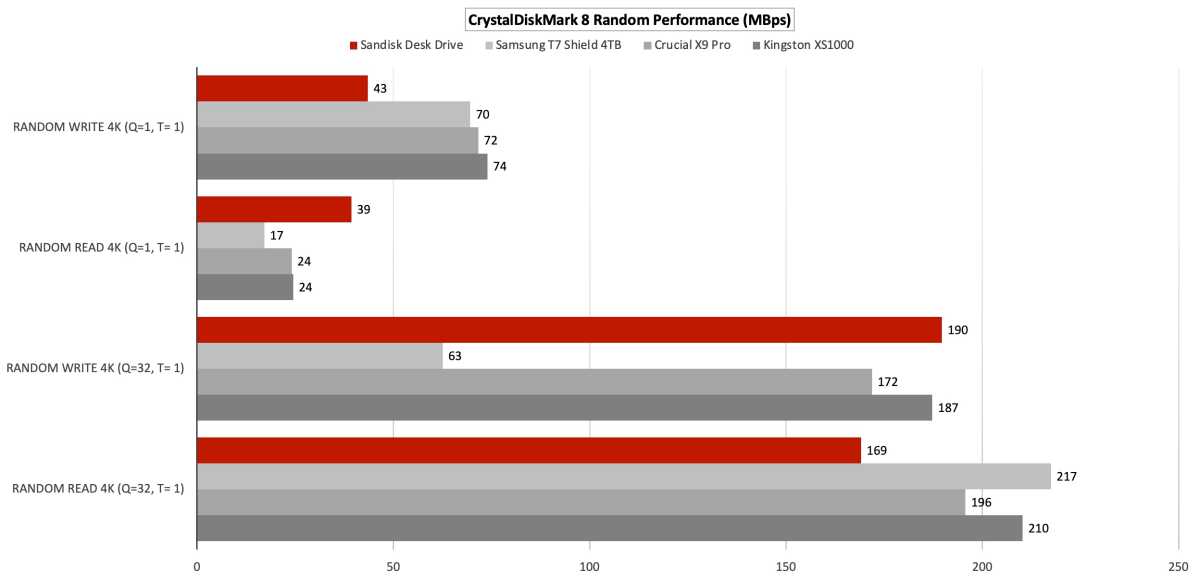
Results were more mixed in random 4K operations. The desktop drive was the fastest in two tests and below average in the other two. As you might notice, this is not unusual for external SSDs – a couple of other drives are inconsistent as well.
The SanDisk Desk Drive 48GB is a hair behind the curve in transfers, but not enough to significantly sway your buying decision.
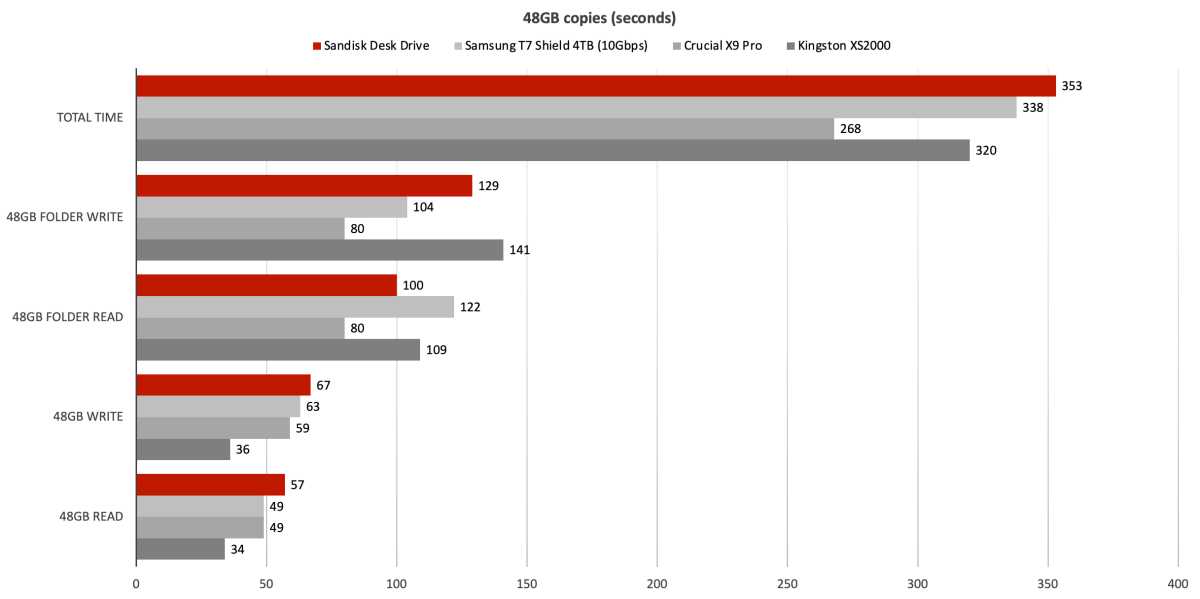
The SanDisk desktop drive was slightly slower than our 48GB transfer speed, but only just.
The SanDisk desktop drive was slightly slower than our 48GB transfer speed, but only just.
Jon L. Jacoby
The SanDisk desktop drive was slightly slower than our 48GB transfer speed, but only just.
Jon L. Jacoby
Jon L. Jacoby
Being an 8TB drive, I wasn't expecting the desk drive to slow down at all in our 450GB write – it didn't. Once I threw another 2TB on the drive, performance wavered a bit — waffling between 250MBps and 900MBps. This was undoubtedly some clever secondary caching that went on with varying degrees of success.
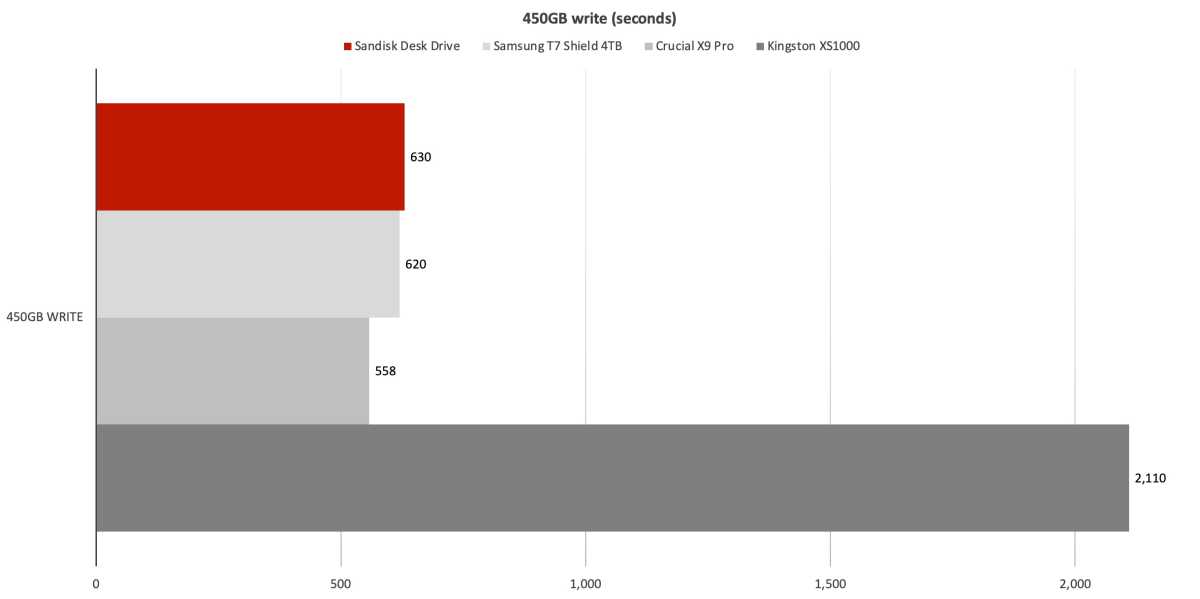
There is very little difference in terms of performance between the SanDisk Desk Drive and its competitors. It boils down the purchase decision to price and form factor. All of its competitors in the above chart are smaller and more portable.
Should you buy a SanDisk desktop drive?
If you're looking for a high-capacity, high-speed upgrade from external hard drives, the SanDisk Desktop Drive will do the job well. It also looks good with your computer in my opinion. That said, there's a lot of competition out there, especially at 4TB capacity. Shop carefully.
How we test
Drive tests currently use Windows 11, 64-bit running on an X790 (PCIe 4.0/5.0) motherboard/i5-12400 CPU combo with two Kingston Fury 32GB DDR5 4800MHz modules (64GB of total memory). Both have 20Gbps USB/Thunderbolt 4 integrated into the back panel and use Intel CPU/GPU graphics. The 48GB transfer tests use an ImDisk RAM disk that takes up 58GB of the 64GB of total memory. A 450GB file is transferred from one 2TB Samsung 990 Pro which also runs the OS.
Each test is performed on a freshly NTFS formatted and TRIM'd drive for optimal results. Note that in normal use, as the drive fills up, performance may decrease due to less NAND for secondary caching, as well as other factors. This is less of a factor with the current crop of SSDs with their much faster NAND.
Warning: The performance numbers shown apply only to the drive that was shipped to us and tested for capacity. SSD performance can vary by capacity and can be caused by more or fewer chips for shotgun read/write and the amount of NAND available for secondary caching. Sellers also occasionally change ingredients. If you ever notice a big difference between this performance and what you experience.airportBy all means, let us know.


