 WebMail


Logitech G Pro X 2 Lightspeed review: The reason I’m now on team graphene
Expert rating
Occupation
- Clear audio with fine detail in sound.
- There is comfort at every turn.
- Point-to-point accurate spatial audio support
- A mix of wireless and wired connectivity
Cons of
- There is no active noise cancellation on board.
- Exposed cords can be prone to breakage.
- It comes with a soft case instead of a more robust hard case.
Our decision
The Logitech G Pro X 2 Lightspeed Wireless Gaming Headset delivers clear, high-fidelity sound. With accurate local audio and tons of customization available in the Logitech GHub app, this headset is a great choice for gamers.
Price upon review
250
Today's best deals: Logitech G Pro X 2 Lightspeed
I really liked the Logitech G Pro X Lightspeed for its high-fidelity audio and comfort. The Pro X 2 Lightspeed is a chip off the winning headset's block for comfort, but with new 50mm graphene audio drivers on board, it sounds even more impressive. In fact, the detail I'm getting in the soundscapes of my favorite RPGs makes me want to replay them all.
The Pro X 2 Lightspeed also benefits from DTS Headphone: X 2.0's highly defined 3D Special Surround Sound, which is truly immersive. Long battery life of up to 50 hours is also a win. There's no simultaneous audio or ANC to speak of, but an excellent level of personalization in the headset's companion app helps tip the scales in the Pro X 2's favor.
Further reading: Check out our roundup The best gaming headset To learn about competing products.
Logitech G Pro X 2 Lightspeed design and construction
When you take the Pro X 2 Lightspeed out of the box, you immediately notice two things: it resembles its predecessor, the Logitech G Pro X Lightspeed, with oval-shaped earcups, thick leather earpads, large, dominant Y-shaped aluminum yoke, and a strong steel frame.
Second, the earcups are about the size of an adult's fist (3.9 x 3.1 inches), and cover my ears just to fit snugly. They also move vertically and horizontally, so I can move my head and neck well. The curly cords near the top of the yoke are prone to fraying, however, so you'll want to keep this headset in a case when not in use.
You can change the volume of each of the seven directional points in the G Hub, to emphasize or soften the sound that originates from each, which I let you work into presets for specific FPS maps. I would recommend…
The left earcup houses almost all the controls except for the 3.5mm auxiliary-in jack, which you can find on the right. These include an on/off switch, volume wheel, mute mic button, USB-C port for charging the headset's onboard battery, and a Bluetooth button. All in all, and with 2.4GHz Wi-Fi, you get three types of connectivity, which is pretty generous.
This allowed me to connect a wide variety of devices including my PC, smartphone, Nintendo Switch, and PlayStation 5 console – so I didn't have to change headsets.
In the box you get a USB-C to USB-A cable and a long 3.5mm audio jack. The two spare earcup covers are a soft velor material so when things heat up you have the option of swapping out the leatherette for cooler, more breathable ones.
As for comfort, it is top notch. The default leather on the cups is soft and the cushioning is deep. A moderate clamp pressure didn't strain my ears. The headset's 12.2-ounce weight was never a burden. It is present on your head, but not enough to injure you.
Finally, the headset comes with a soft storage case. I would have preferred a hard case with compartments, if only to prevent accessories from rolling around and scratching its pretty facade. Still, a case is better than none at all.
Logitech G Pro X 2 Lightspeed performance
No matter whether you're using the 3.5mm auxiliary-in, Bluetooth, or wireless connectivity, these cans sound amazing. 50mm graphene audio drivers are the reason. They can pick up the smallest vibrations, so the Pro X 2 has an excellent frequency response and low distortion.
Music, games and movies seemed equally impressive in my testing. In games, though, two things stand out: the high level of detail in the soundscape and the clarity of the audio.
In fact, just like in RPGs Alden Ring I enjoyed listening to the game's background drones, sheep bleating, and ambient sounds like rustling grass.
Even the audio description had me pausing to soak it all in from time to time. The mids also sounded natural and crisp, and the treble tones held their shape without any irritating tinny or shrillness. But the bass impressed me the most. This is definitely a headset that pushes the bottom to the fore for maximum impact.
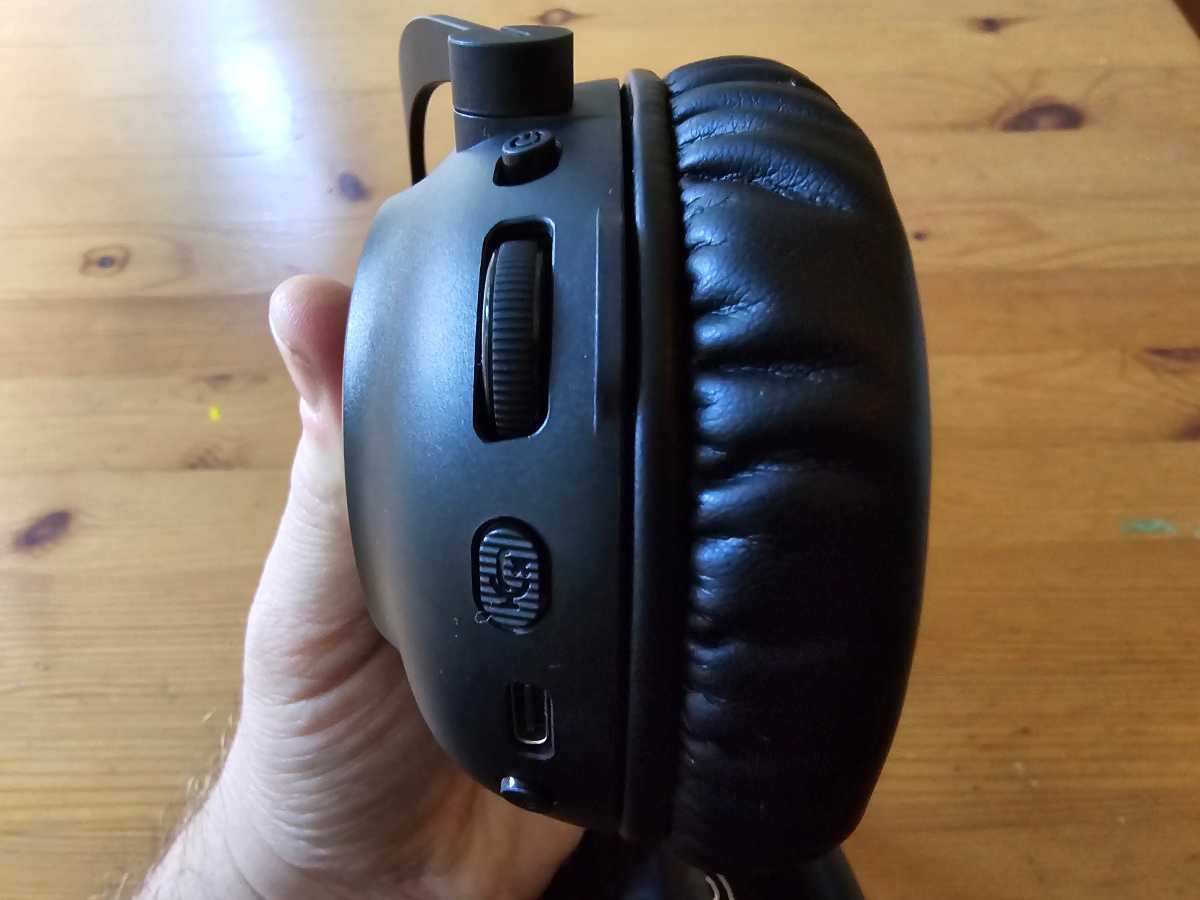
Luxurious leatherette covers the Logitech G Pro X Lightspeed's earcups for a comfortable feel.
Luxurious leatherette covers the Logitech G Pro X Lightspeed's earcups for a comfortable feel.
Dominic Bailey / IDG
Luxurious leatherette covers the Logitech G Pro X Lightspeed's earcups for a comfortable feel.
Dominic Bailey / IDG
Dominic Bailey / IDG
In fact, that bass isn't just commanding – where most gaming headsets would be happy to leave – it's also exceptionally smooth. I never got that uncomfortable pressure cooker feeling on my ears that I sometimes get with really stale headsets, which is a rare thing I've enjoyed.
That bass is impressive even in default mode, before you activate the Bass Boost preset in the Logitech G Hub companion app, so you can turn it on for more impact if you want.
The left earcup also has a discreet slot for the headset's 6mm detachable cardioid boom microphone. The mic is flexible and also comes with a clean pop filter at the end. The mic did a great job of making my voice sound clear and warm. The filter also reduced the pops and hisses in my Discord chats.
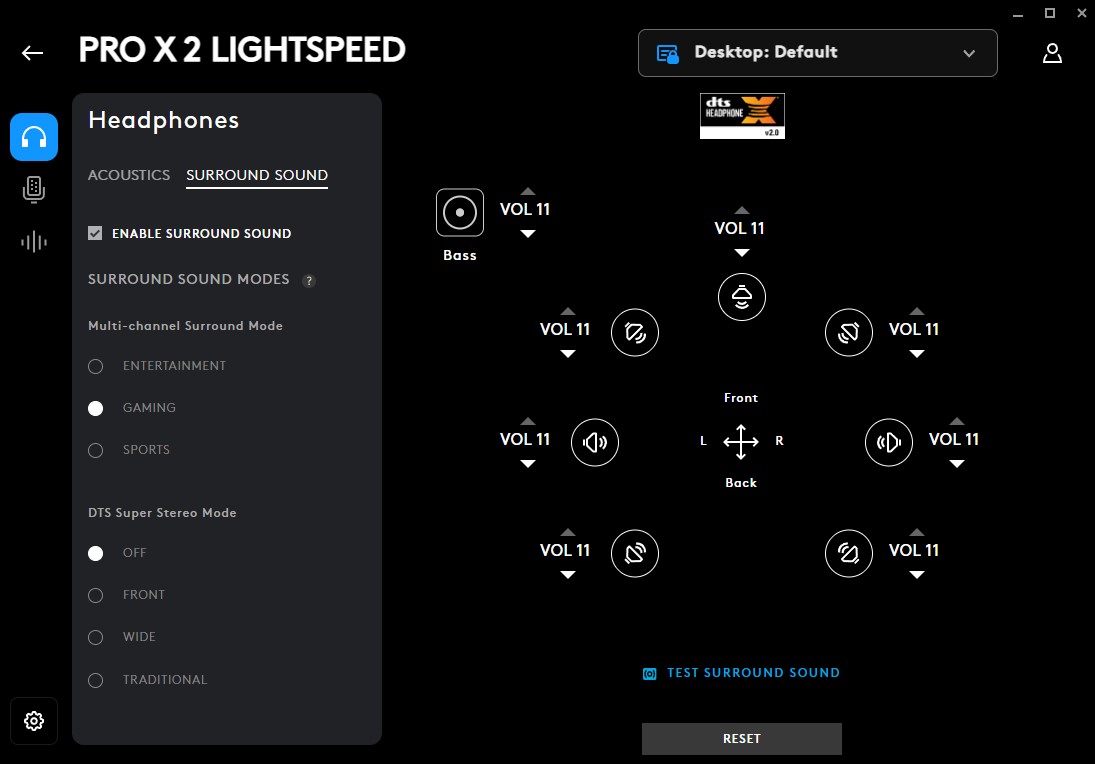
Surround sound was also a joy to play with, so I kept it on most of the time. This proved useful in helping me identify player footfalls in games such as Counter Strike 2. I can change the volume of each of the seven directional points in the G Hub, to emphasize or soften the sound produced at each point, which I let you work into presets for specific FPS maps. Will recommend.
Dominic Bailey / IDG
Dominic Bailey / IDG
Dominic Bailey / IDG
I also had a lot of fun with the microphone settings in Ghub. Applying presets to my voice using Blue Vo!ce allowed me to increase its quality. My go-to's were “Broadcaster,” which gave my voice an authentic quality, and “Crisp and Warm,” which did exactly what its name suggests.
Another cool feature in Ghub is the “Sampler”. Here you can create your own macros or random expressions to use in your games. A list of ready-made expressions comes in different languages, so they can be a fun icebreaker if you're playing on overseas servers.
This is some important functionality that you can tweak. There's a lot more I wish the headset had, especially since it costs $250 at checkout — namely active noise cancellation (ANC) and simultaneous audio, but the Pro X 2 doesn't. Is.
You can still access your different audio sources separately though. A simple button press switches you between Bluetooth and Wi-Fi modes, which I found very handy when I wanted to use the headset between multiple devices in one sitting.
Should you buy the Logitech G Pro X2 Lightspeed?
In its purest form, you could say that the G Pro X 2 really takes advantage of what's most important to most gamers — audio quality, comfort and connectivity.
The fact that it dispenses with ANC and simultaneous Bluetooth functionality, a headset worth $250. But, with such amazing audio fidelity and features like DTS Headset: X 2.0 surround sound, even that oversight seems forgivable.
In fact, I'm enjoying all the details I can now hear in the soundscapes of my favorite RPGs — details that bring them to light in new and fascinating ways.


