 WebMail


Keychron M3 mini 4K Metal Edition review: Simply excellent
 At a glance
Expert rating
Occupation
- An excellent sensor that accurately synchronizes movement.
- 4K polling rate
- Strong and lightweight metal chassis
Cons of
- The perforated back will not conform to the claw grip.
- Small size is not good for big hands.
- Battery life in 4K polling mode is not good.
Our decision
The Keychron M3 mini 4K Metal Edition is a great gaming mouse that boasts great performance, a sturdy lightweight chassis and all the connectivity options you'll ever need.
Price upon review
99
Today's best deals: Keychron M3 mini 4K Metal Edition
Kekron's M3 Mini 4K Metal Edition is the ultimate all-rounder gaming mouse. It is strong and sturdy, armored with a metal chassis, and yet very light; It also has all the connectivity options you could ever need, and lightning-fast 4K polling rates that will keep you competitive in the fastest games.
At $99 it carries a higher price tag than some mice in Keychron's lineup. But with a combination of durability, functionality, and style, gamers of all types are going to really dig this mouse.
Further reading: Check out our roundup The best gaming mice To learn about competing products.
Keychron M3 mini 4K Metal Edition: Design and build
With a perforated back covered with a grid of geometric shapes, the Keychron M3 mini 4K Metal Edition has a futuristic aesthetic that is unique and fresh. That said, perforated backs are a magnet for dust and spills, so this is one mouse you'll really want to keep your coffee cup away from.
I can use less force in my clicks but still feel like I had the fastest possible action…
The M3 mini 4K Metal Edition has a symmetrical right-hand layout with two small left-hand thumb buttons and two compact main clicks. The mouse wheel consists of three more clicks and, on the bottom, you'll find a DPI switcher, polling rate button, and a button to switch between Bluetooth mode and Wi-Fi mode.
Delicate contours on either side of the chassis easily mold the mouse to fit comfortably in my hand, so that I felt a lot of control no matter which direction I moved it. The backs of each main click are also perforated, which isn't particularly comfortable for claw grips, but is comfortable enough for palm or finger grip types.

The Keychron M3 mini 4K is best suited for medium-sized hands.
The Keychron M3 mini 4K is best suited for medium-sized hands.
Dominic Bailey / IDG
The Keychron M3 mini 4K is best suited for medium-sized hands.
Dominic Bailey / IDG
Dominic Bailey / IDG
All is not lost if you prefer a claw grip. Make a Keychron too A non-metal version of the M3 Mini 4K With a closed top, so go for it if claw grips are your jam.
I was happy with the weight of the mouse but the size just suited my large hands. Still, its designation as a “mini” doesn't mean it's small—it's just a bit smaller than other full-size mice. Dimensions measure 4.76 x 2.36 x 2.62 inches overall, so some players may have a quarter-inch overhang in front.
The chassis is made of lightweight magnesium material, so the M3 Mini 4K Metal Edition is remarkably strong. The perforated shell serves to keep weight to a minimum. In fact, it weighs just 2.25 ounces (64 grams). This made it suitable for FPS games and was easy on my wrist and arm for long play sessions.
After using this mouse now, I'm a big fan of the magnesium alloy in the mouse chassis. It made the black glow like a starry night sky under bright lights, an effect I never tire of seeing.
Keychron M3 mini 4K Metal Edition: Connectivity and battery life
The 4K Metal Edition's connectivity options offer great versatility for both gaming and work on the go. To connect wirelessly, you get a 2.4GHz wireless receiver. Bluetooth Connects via Bluetooth version 5.1.
Both of these connection types were fast for me, providing smooth, uninterrupted gameplay. A 4K Wi-Fi receiver allowed me to set the maximum polling rate to 4,000Hz, four times the rate reported by some of the fastest esports mice released last year. Consequently, I was glad to see that it was included in the purchase price.
In the box, the Keychron M3 mini 4K Metal Edition also comes with a USB-C to USB-C cable for wired connection. It's a paracord, so it has an instant feel like a shoelace that just slides across your desk.
As for battery life, you have the option of setting the polling rate to 1K for the longest possible life of up to 600 hours, or 4K for a more modest battery life of around 40 hours.
Keychron M3 mini 4K Metal Edition: Gaming performance
The M3 mini 4K Metal Edition features a Pixart PAW 3395 sensor with a maximum DPI resolution of 26,000 DPI and a maximum speed of 650 inches per second. Complementing these impressive stats is the mouse's lightning-fast 50g acceleration rate, which makes it exceptionally fast.
The PAW 3395 has a reputation for being a bit more syncopated in polling events than some other Pixart sensors and this proved true for me in my playtesting. I noticed a lot of consistency in the mouse movements – they felt crisp with a distinct absence of any hiccups or jumps in movement.
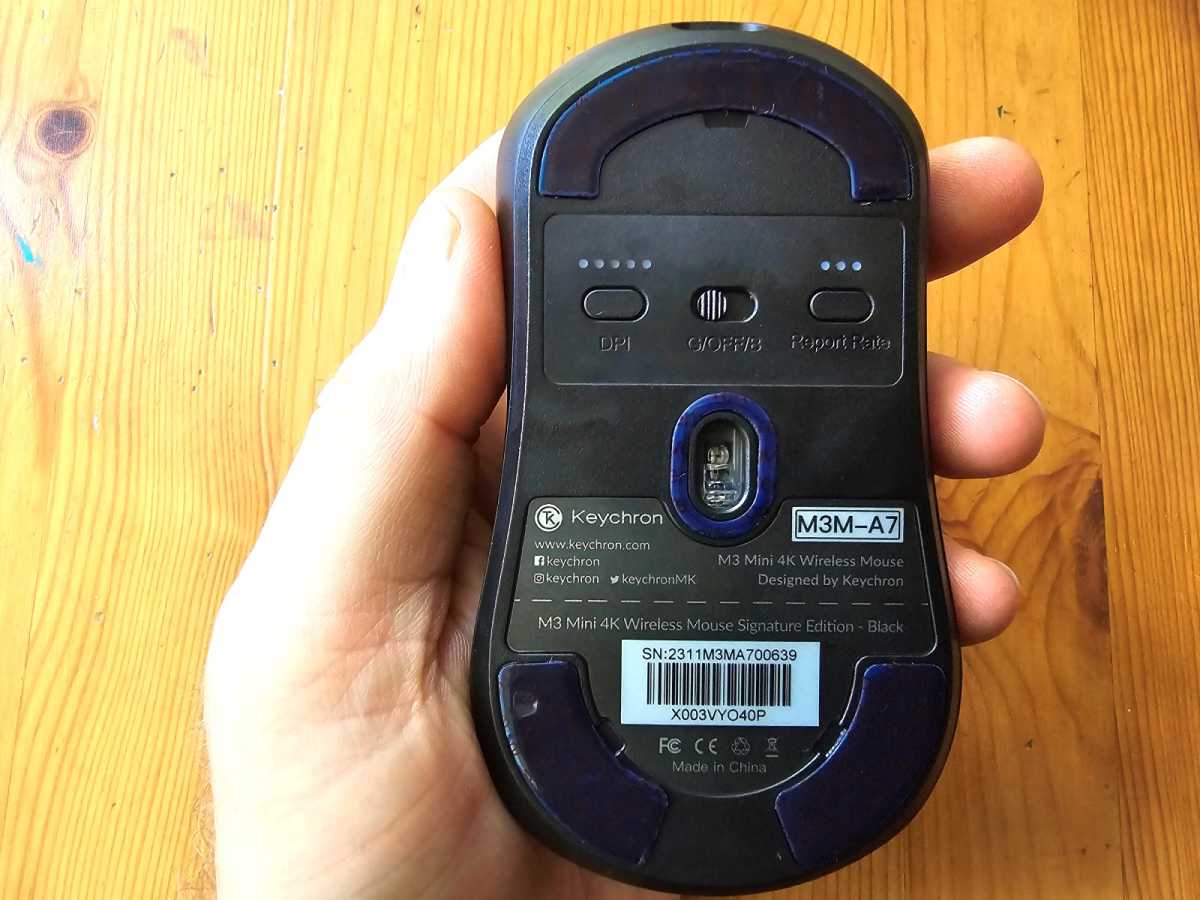
Keychron M3 mini 4K Metal Edition has DPI switcher and polling rate button below it.
Keychron M3 mini 4K Metal Edition has DPI switcher and polling rate button below it.
Dominic Bailey / IDG
Keychron M3 mini 4K Metal Edition has DPI switcher and polling rate button below it.
Dominic Bailey / IDG
Dominic Bailey / IDG
I Battlefield I The 4K polling rate made a big difference in the speed at which I could track opponents. At times when I thought I was going to miss goals, I would often have unexpected successes, which was a nice surprise and a big confidence boost.
The buttons look great too. They are some of the softest I've used, but their debounce is incredibly fast. They took all the effort out of me, allowing me to click with only the slightest pressure. I can use less force in my clicks but still feel like I had the fastest possible action.
This answer comes courtesy of the mouse's Huano 80M microswitches. They are also rated for a long life of 80 million clicks.
I also really liked how easy it was to change the DPI and polling rate with the external buttons. The Keychron makes this even easier with useful RGB indicator lights that let you know what polling rate you've selected, so I never had to pause my game and go into the app to find out. What would I change?
Keychron M3 mini 4K Metal Edition: Software
Keychron Engine is a companion app to 4K Metal Editon. The software is easy to follow and provides a decent amount of customization.
You can tweak the usual suspects like DPI and polling rate, and assign macro key functions, but there are also some more in-depth settings to modify like mouse liftoff distance and sensor performance. .
The “Sensor Performance” setting allows you to enable Motion Sync, one of the key benefits of the PAW 3395 sensor, allowing it to match the mouse sensor's motion to polling rate events for smoother, more accurate motion. It adapts to
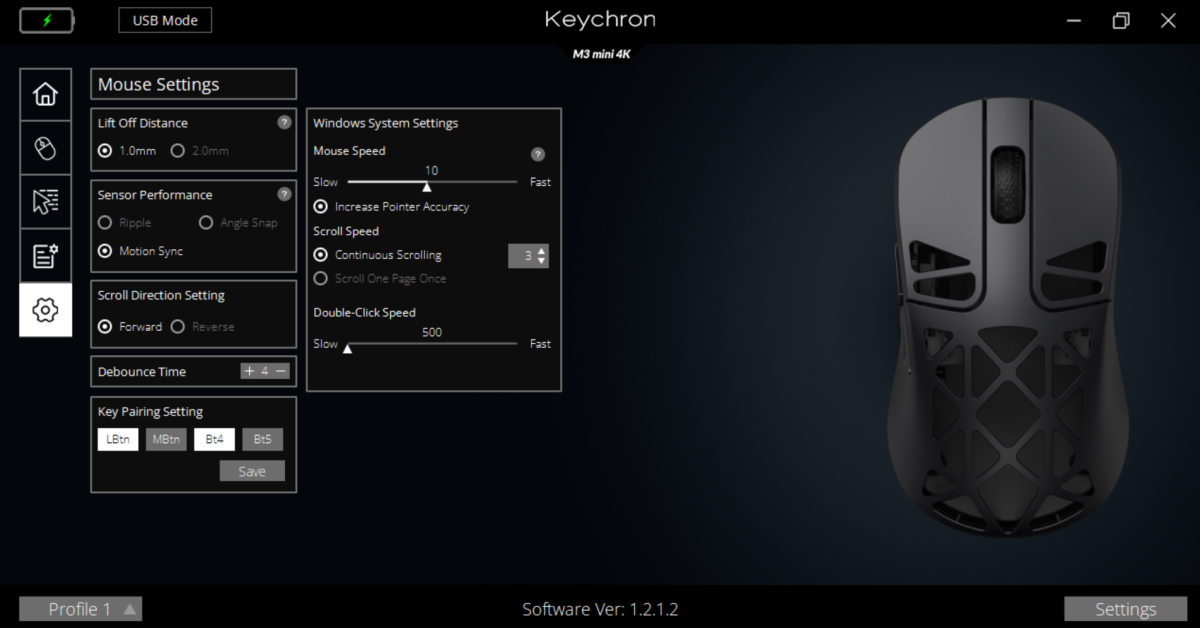
The Keychron Engine allows you to implement Motion Sync, which closely synchronizes sensor movement to polling rate events.
The Keychron Engine allows you to implement Motion Sync, which closely synchronizes sensor movement to polling rate events.
Dominic Bailey / IDG
The Keychron Engine allows you to implement Motion Sync, which closely synchronizes sensor movement to polling rate events.
Dominic Bailey / IDG
Dominic Bailey / IDG
Should you buy the Kecron M3 Mini 4K Metal Edition?
If I were shopping for a mouse that's fast enough to go toe-to-toe with some of the best esports mice out there, but packs in more functionality than you'll find in most — Bluetooth, a DPI switcher, and a very sturdy metal body — then the Keychron M3 mini 4K Metal Edition would be at the top of my list.
This mouse has almost everything I want and need in a gaming mouse. I also like that if I buy some of the premium competitors, that leaves about $50 in my pocket. So, if you want a great mouse and want to save some money too, this mouse is a sure bet.


