 WebMail


Here's why the F and J keys on keyboards have bumps on them
When typing on a keyboard, whether on a laptop or a PC, you'll notice little quirks – for example, bumps on certain keys. But what purpose do these little bumps actually serve?
These elevations serve a very practical purpose: they help you find keys and type blindly. This technique, also known as blind typing or ten-finger typing, allows you to type faster and more accurately without looking at the keyboard. It's based on feel and muscle memory, which allows you to intuitively know the position of each key.
The placement of bumps on the F and J keys on standard QWERTY and QWERTY keyboards is no coincidence. It serves as an orientation aid for the right and left index fingers. This makes it possible to find your way around any keyboard without affecting your typing speed. Keyboards with numeric keypads often have a raised section on the key next to the number 5 for easy navigation in the number field.
The advantages of a blind typing system are manifold: in addition to faster typing speed, it improves accuracy, as you can constantly look at the screen and make corrections directly without first looking for the right keys. Keyboard shortcuts are also easy to use. This can be a considerable performance advantage, especially when working with software.
Further reading: The best wireless keyboards
Professional typists achieve a speed of 43 to 80 words per minute (WPM). With practice and the right technique, speeds over 100 WPM are possible. The traditional ten-finger typing method requires the index fingers to rest on the F and J keys while the other fingers operate the adjacent keys. Although this method is considered effective, studies show that other factors such as hand movements and the number of fingers used can also affect typing speed.
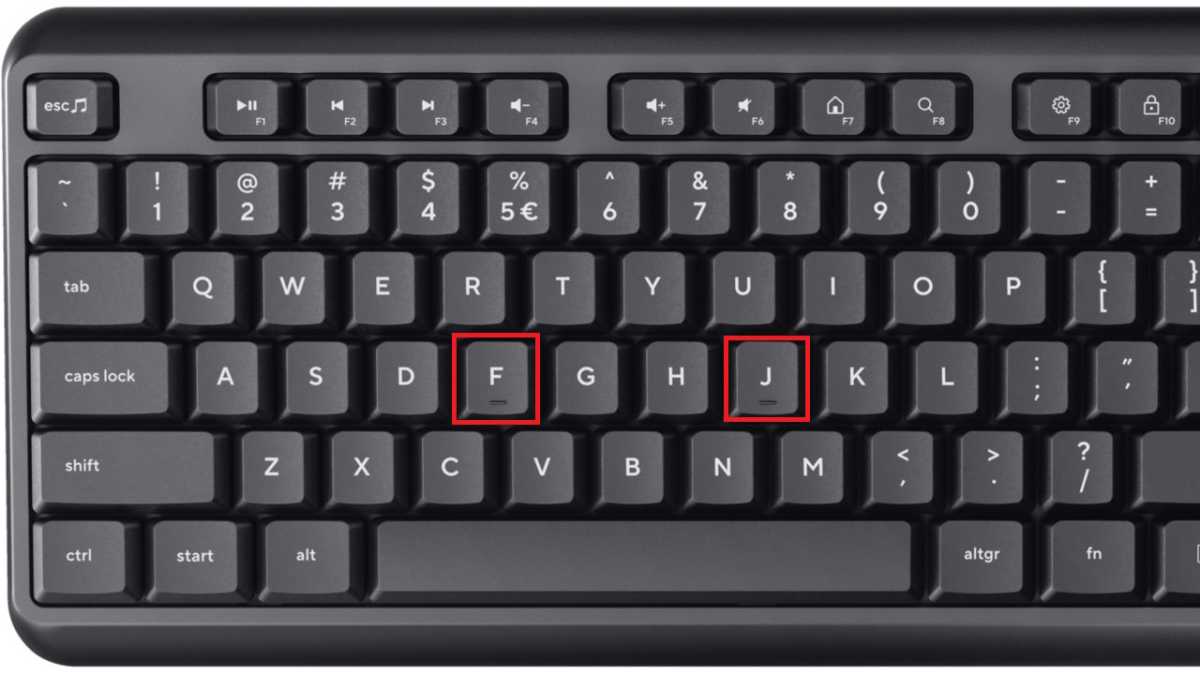
The small bumps on the F and J keys aren't the only design elements. Rather, these veterans are often an important guide for typists – and for those who want to become one.
The small bumps on the F and J keys aren't the only design elements. Rather, it's an important guide for experienced frequent typists – and for those who want to become one.
IDG
The small bumps on the F and J keys aren't the only design elements. Rather, it's an important guide for experienced frequent typists – and for those who want to become one.
IDG
IDG
Along with self-learned skills, practice can make a significant difference. Websites like Type Racer. Provide a fun environment to improve typing speed and accuracy. To do this, they turn typing into a race against others while keeping an eye on accuracy.
Ultimately, practice is the key to perfection. The small bumps on the F and J keys are more than just a design decision — they're tools on the way to a more efficient and effective typing experience.
This article was originally published on our sister publication. PC-WELT and translated and localized from German.


